
A camera pans across a city. Instead of a continuous glide, the buildings seem to advance in little steps. In another programme the movement is wonderfully smooth, yet the actors look as though they are standing in a brightly lit rehearsal. These are different observations. Treating both as a single problem called “bad motion” makes television settings unnecessarily confusing.
Begin with three questions: how often was a new image captured, how often can the screen update, and what processing happens between those points? Once those are separated, a useful adjustment becomes a small experiment rather than an evening spent changing every slider.
Three clocks, three jobs
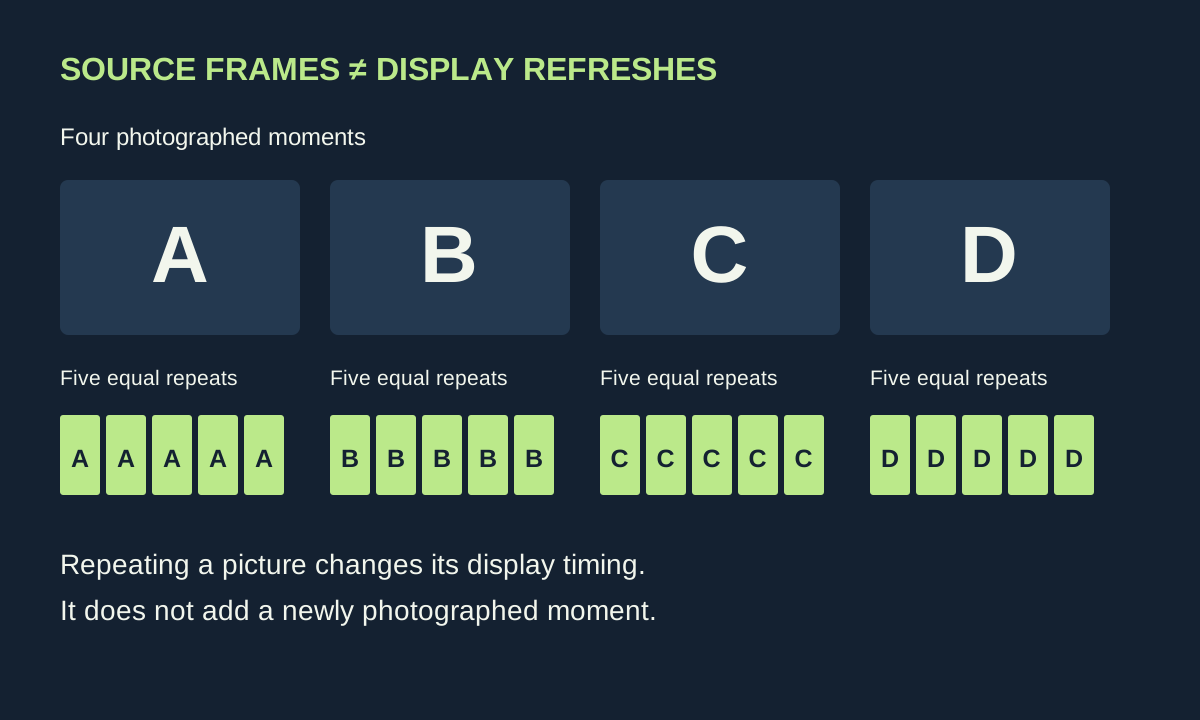
The programme’s frame rate describes distinct pictures per second. A display refresh rate describes opportunities to update the panel. A 120 Hz screen does not create 120 genuinely photographed moments from a 24-frame-per-second film. It can repeat each original picture five times, retaining the timing of the source.
Consider an idealised sequence labelled A, B, C and D. Equal repetition might display AAAAA, BBBBB, CCCCC, DDDDD. There are more refreshes, but only four different source images. Interpolation takes another approach: processing estimates intermediate positions between A and B. Those estimates can make motion appear more continuous, but they are not additional camera observations.
This distinction also explains why a specification on the box cannot describe every experience. Panel capability, the incoming signal, the player’s output setting and the television’s processing all participate. A streaming device feeding a fixed format is another link in the chain, not simply an invisible cable.
Uneven timing is different from limited source motion
In a simplified 24-to-60 conversion, one frame lasts three refreshes and the next two. The arithmetic fits, but the display time alternates. That uneven cadence can add a rhythmic hitch to a pan. By comparison, evenly displayed 24 fps material still contains relatively few positions of a fast-moving object. Removing uneven cadence cannot supply missing photographed instants.
Our letter sequence is a teaching model. Actual pipelines can involve fractional frame rates, interlacing, reconstruction and display-specific behaviour. It nevertheless gives you a useful diagnostic question: does the movement have an alternating rhythm, or does every step seem equally visible?
On supported Apple TV models, Match Frame Rate asks the player to match the source cadence. Apple’s documentation also explains that format changes can briefly blank or flicker the display. That short transition should not be confused with a continuing fault during playback. Other players use different controls, and app support can vary.
The smoothing experiment
Choose a scene with a steady pan and a moving foreground subject. Record the current picture preset and motion options before changing anything. Watch the scene with interpolation disabled, then at its lowest available level, keeping the source and room unchanged. Do not compare a football match in one mode with a film in another: the material itself has changed.
Watch the edge of a person passing a fence or a fast-moving object crossing a detailed background. If processing produces an outline that bends, fragments or briefly disappears, write down the time. Now replay it without interpolation. A repeatable difference is much more informative than deciding one setting is “cinematic” and another is “wrong”.
The UHD Alliance’s Filmmaker Mode specification turns motion interpolation off and preserves the source frame rate and aspect ratio. It supplies a useful reference for intended presentation. Personal comfort can still lead a viewer to prefer a small amount of smoothing; the important thing is to recognise the trade-off rather than believe new photographic detail has appeared.
Build a two-minute test reel from things you already watch
- A slow pan: use buildings, trees or shelves with clear vertical edges. Note regular stepping and irregular hitches separately.
- A foreground crossing: look for processing artefacts around moving outlines, especially against busy scenery.
- A familiar conversation: decide whether faces and gestures still have the presentation you prefer.
- A live programme: check a moving camera and graphics together. Do not assume it was produced at the same frame rate as the film.
Keep the comparison short. Repeatedly pausing can reveal detail, but motion must also be judged while moving. Use the same seat and avoid switching several controls at once. A simple notebook entry—source, time, setting, observation—turns an uncertain impression into something you can reproduce tomorrow.
When the problem is elsewhere
A freeze followed by a jump forward may be a delivery or playback interruption. Try the same moment again. If it fails at a different point, check another programme and the service’s playback diagnostics before altering motion processing. The companion guide to streaming quality beyond a speed test separates those delivery problems from display behaviour.
If only one external player shows the issue, compare the television’s built-in app where the same programme is available. This is not proof that one device is better; it narrows the suspect chain. If both show the same effect at the same moment, the source or a shared display setting becomes a more useful place to investigate.
Finally, preserve a route back. Save a photograph of the menus or write the original values down. Film and sport can justify different preferences, and some televisions store settings separately by input or signal type. The goal is a repeatable choice that suits the programme—not a universal list of numbers copied from a different screen.
Keep the test scene’s time with those notes. A later comparison is much easier when you can return to the same movement instead of relying on your memory of how another programme looked.