
The internet package promises a large number. A speed test looks healthy. Yet a programme becomes soft, pauses at awkward moments or looks worse on the television than on a laptop. The contradiction disappears when you stop treating streaming as a single measurement.
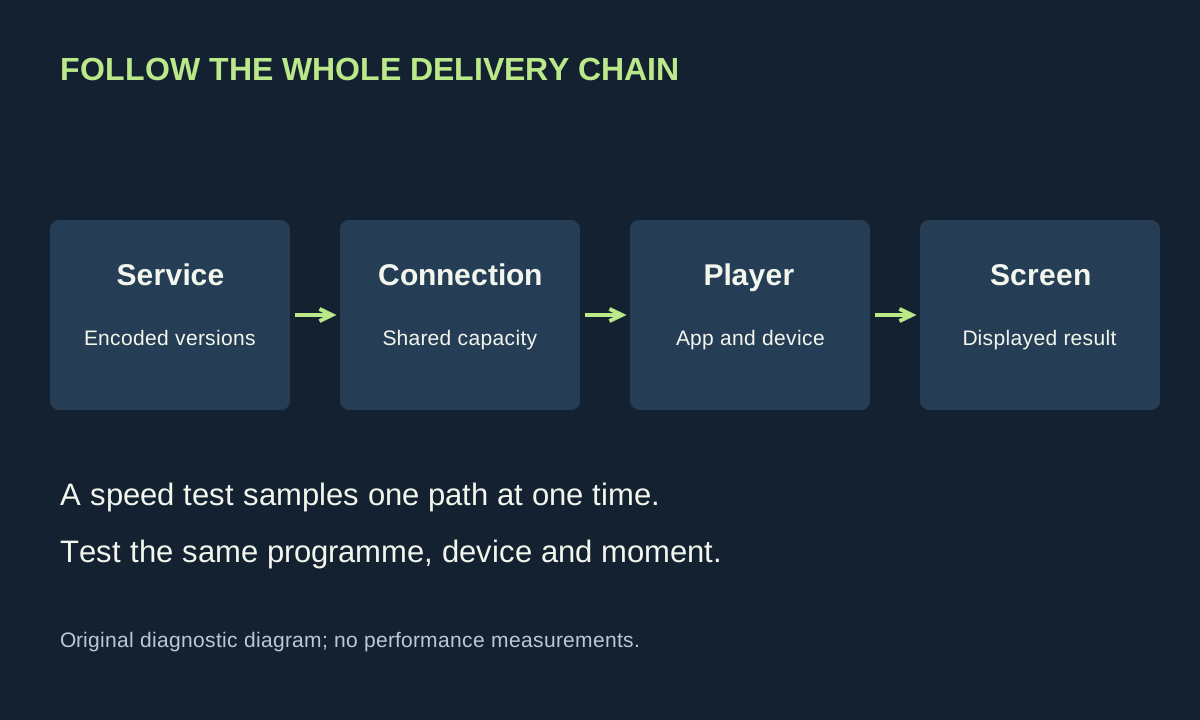
A stream travels through a service’s encoding and delivery system, your internet connection, the home network, an app and a playback device. The screen then displays what it receives. A fast result on one device at one moment tells you something about one path; it does not certify the entire chain.
Resolution is only one description
Resolution describes the dimensions of the image. Bitrate describes data delivered over time. Compression decides how efficiently that data represents the programme. Two pictures with the same pixel dimensions can retain different amounts of texture, particularly during motion or in complicated scenes.
Adaptive streaming commonly offers several encoded versions split into segments. The player can select between them as conditions change. MDN’s guide to adaptive media explains the underlying use of multiple quality versions and playlists. For a viewer, the practical consequence is that playback may continue while visible detail changes.
This is why an occasional soft moment and a complete pause should be recorded separately. The player may be protecting continuity in the first case; in the second, it may lack enough usable data to continue. Neither observation alone identifies whether the bottleneck is inside the home or outside it.
Use service requirements as a reference, not a promise
Netflix currently recommends stable speeds of at least 3 Mbps for 720p, 5 Mbps for 1080p and 15 Mbps for 4K in its published connection guidance. Those are service-specific recommendations, checked for this guide in October 2026. They are not universal requirements for every streaming service or a guarantee of a particular picture.
A connection also serves other activity. A large download, another television and a cloud upload may share capacity. A brief speed test conducted when the house is quiet may not represent the conditions when everyone starts using the network after dinner.
Keep units straight. A megabit per second measures a rate; a gigabyte allowance measures an amount. In a deliberately simplified calculation, a constant 10 Mbps stream for one hour transfers about 4.5 GB before additional overhead: ten million bits multiplied by 3,600 seconds, divided by eight and then by one billion. Real adaptive streams vary, so this is an arithmetic example, not a consumption forecast.
Make the symptom reproducible
Write down the programme, approximate time, device, app and symptom. Then repeat the same section. If the problem always appears at precisely the same moment, try another device or source before blaming broadband. If the fault occurs at different times, a changing delivery condition becomes a stronger possibility.
Compare another title within the same service, then a different service on the same television. Do not start with a factory reset. The comparison can identify whether the issue follows the title, app, device or home location while preserving account settings and household routines.
A useful log contains observations rather than verdicts: “image softened for ten seconds” is better than “provider throttled the stream”. The latter is a causal claim requiring evidence that an ordinary living-room test has not supplied.
Test the television’s path
Use the app’s connection test where it offers one. A laptop beside the router is a poor substitute for a television across the house. If a safely routed Ethernet connection is available, compare it temporarily with Wi-Fi using the same content and device. Avoid cables across walkways or changes to shared equipment you do not administer.
If wired playback is stable while wireless playback is not, investigate the local wireless link. If both fail similarly, the result shifts attention elsewhere without proving a particular external cause. Try again at another time and note what other network activity was taking place.
For a brief comparison, pause a large nonessential transfer that you control. Do not interrupt another person’s work or an essential backup without agreeing a time. If the symptom disappears, repeat the comparison once rather than assuming the first coincidence establishes causation.
Check entitlement and compatibility
The title, subscription, app and playback device can constrain available quality independently of bandwidth. Read the service’s current help for your exact combination. A 4K panel cannot turn a lower-resolution source into original 4K detail, even though the television scales the image to fill its pixels.
Check for an app update using the normal supported route. Restarting the app or device can be a reasonable reversible step, but record whether it actually changes the result. Avoid unverified “boosters”, unofficial streaming software or broad router changes offered as universal fixes.
Persistent blocky detail during demanding scenes may be part of the supplied encode. Raising television sharpness cannot recover discarded information and can exaggerate edges. Likewise, motion interpolation changes presentation rather than increasing network capacity. Our picture setup guide keeps those display adjustments separate.
Give support a useful problem report
If you need help, provide the device model, app version where available, times of failure, whether other titles work, and the wired-versus-wireless comparison. Remove account details from screenshots. A narrow reproducible report gives support a better starting point than a photograph of one impressive speed-test number.
Stop changing settings once the experiment identifies a sensible next step. The most valuable outcome may be learning that one app needs attention while the network is fine. It may also be recognising an unresolved service problem. Either result is more useful than buying a faster package without knowing what it is meant to fix.